什么是elasticsearch?
Elasticsearch是一个基于java语言开发的分布式多用户的全文搜索引擎,在云计算中,能够达到实时搜索,稳定、可靠、快速,安装方便。
官方客户端在java、PHP、Python、.NET等其他语言都是可用的。
Elasticsearch 是一个分布式、高扩展、高实时的搜索与数据分析引擎。
安装Elasticsearch
首先安装java环境,因为Elasticsearch是基于java运行的。参考:java的安装。
下载Elasticsearch,建议最新版,其他版本我下载后出现问题,解决非常麻烦。
GitHub下载地址:https://github.com/elastic/elasticsearch
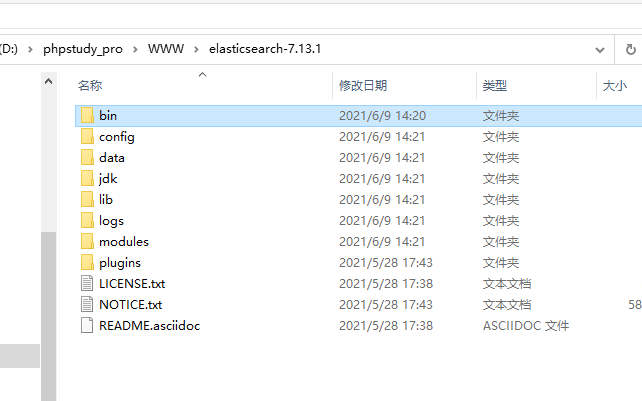
下载成功后打开根目录样式如下:
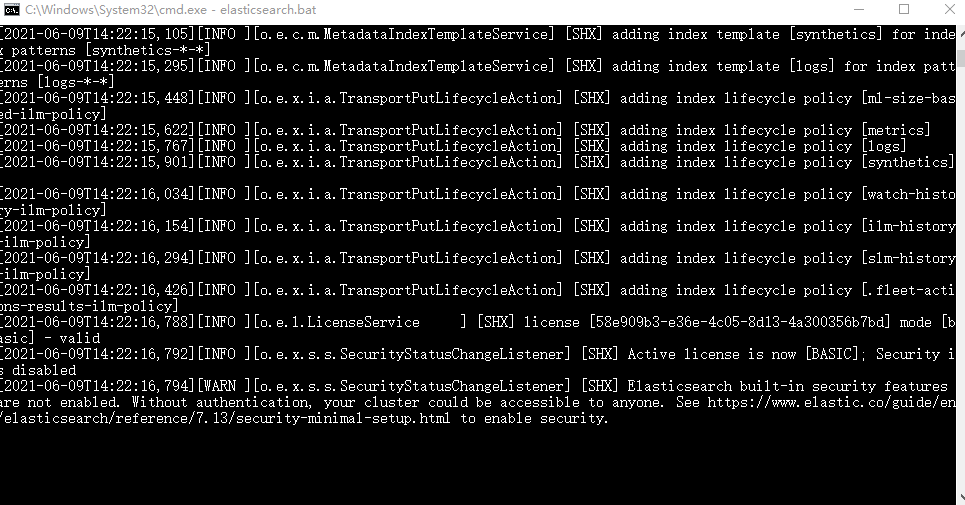
命令行启动Elasticsearch服务:
浏览器访问以下地址,如果如图显示则安装成功!
end
elasticsearch.bat
http://localhost:9200/
安装Elasticsearch管理工具:Elasticsearch-Head
此工具是为了对Elasticsearch中的数据进行可视化管理,类似于Navicat。
安装使用参考查看:Elasticsearch-Head的安装。
安装中文分词器:Elasticsearch-analysis-ik
Elasticsearch-analysis-ik中文分词器是为了将中文搜索条件进行分词搜索使用的。
安装使用参考查看:Elasticsearch-analysis-ik的安装。
在PHP中安装Elasticsearch
1、首先下载composer
2、cmd进入项目根目录下
3、使用composer命令进行安装:
composer require elasticsearch/elasticsearch
4、end
在TP中使用Elasticsearch
use Elasticsearch\ClientBuilder;

class Es extends BaseController
{
    protected $client;
    public $index_name;//索引值,类似于数据库名

    /**
     * Es constructor.
     * @param string $index_name 索引名称
     */
    public function __construct($index_name = "shx")
    {
        parent::__construct();
        //给定默认值
        $this->index_name = $index_name;
        //自动连接Elasticsearch服务器
        $this->client = ClientBuilder::create()->setHosts(['127.0.0.1:9200'])->build();
    }


    /**
     * ELasticsearch初次使用
     */
    public function index()
    {
        //删除原索引
        //$this->delete_index();
        //创建新索引
        //$this->create_index();
        //自定义内容,也可换成数据库内容
        $docs = [];
        $docs[] = ['id' => 1, 'name' => '叶凡', 'content' => '我做的ui界面强无敌。', 'age' => 23];
        $docs[] = ['id' => 2, 'name' => '秦昊', 'content' => '我的php代码无懈可击。', 'age' => 24];
        $docs[] = ['id' => 3, 'name' => '萧炎', 'content' => 'C的生活,快乐每一天。', 'age' => 29];
        $docs[] = ['id' => 4, 'name' => '林动', 'content' => '就没有我做不出的前端页面。', 'age' => 26];
        $docs[] = ['id' => 5, 'name' => '唐三', 'content' => 'php是最好的语言。', 'age' => 21];
        $docs[] = ['id' => 6, 'name' => '秦宇', 'content' => '别烦我,我正在敲bug呢!', 'age' => 25];
        $docs[] = ['id' => 7, 'name' => '宋书航', 'content' => '为所欲为,不行就删库跑路', 'age' => 27];

        foreach ($docs as $k => $v) {
            //添加文档
            $this->add_doc($v['id'], $v);
        }

        //查看映射(整个index索引的相关信息,不包括数据)
        //$res = $this->get_mapping();
        //搜索结果
        $search_where = [
            'bool' => [
                'should' => [
                    [
                        'match' => [
                            'content' => [
                                'query' => '删库 别烦我',//查询内容
                                'boost' => 3, // 权重大
                            ]
                        ]
                    ],
                    [
                        'match' => [
                            'name' => [
                                'query' => '删库 别烦我',
                                'boost' => 2,
                            ]
                        ]
                    ],
                ],
            ],
        ];
        //按照搜索条件,age倒序排列,每页10条数据,查看第一页的数据
        //$data = $this->search_doc($search_where, ['age' => ['order' => 'desc']], 0, 10);
        //按照搜索条件,按照匹配度由高到低排序,每页2条数据,查看第一页的数据
        $data = $this->search_doc($search_where, [], 0, 2);
        dump($data);
    }


    /**
     * 创建索引
     * @return array|mixed
     */
    public function create_index()
    {
        //给定索引名
        $index_name = $this->index_name;
        // 只能创建一次
        $params = [
            'index' => $index_name,
            'body' => [
                //定义映射中的一些设置
                'settings' => [
                    'number_of_shards' => 5,//数据分片数,默认为5,有的时候也会用3
                    'number_of_replicas' => 0//数据备份数,如果只有一台机器,则设置为0
                ]
            ]
        ];

        try {
            //完成创建索引的映射
            return $this->client->indices()->create($params);
        } catch (Elasticsearch\Common\Exceptions\BadRequest400Exception $e) {
            $msg = $e->getMessage();
            $msg = json_decode($msg, true);
            return $msg;
        }
    }

    /**
     * 删除索引
     * @return array
     */
    public function delete_index()
    {
        //给定索引名
        $index_name = $this->index_name;
        $params = ['index' => $index_name];
        //删除指定索引,包括其中的数据映射等
        $response = $this->client->indices()->delete($params);
        return $response;
    }


    /**
     * 查看映射
     * @return array
     */
    public function get_mapping()
    {
        //给定索引名
        $index_name = $this->index_name;

        $params = [
            'index' => $index_name,
        ];

        //查看指定索引下指定
        $response = $this->client->indices()->getMapping($params);
        return $response;
    }

    /**
     * 添加文档,一次仅插入一条
     * @param $id   此条数据索引id
     * @param $doc  此条数据具体内容,例:['name'=>'shx']
     * @return array|callable
     */
    public function add_doc($id, $doc)
    {
        //给定索引名
        $index_name = $this->index_name;

        $params = [
            'index' => $index_name,
            'id' => $id,
            'body' => $doc
        ];
        //添加一条文档
        $response = $this->client->index($params);
        return $response;
    }

    /**
     * 判断文档存在
     * @param $id   索引id
     * @return bool
     */
    public function exists_doc($id)
    {
        //给定索引名
        $index_name = $this->index_name;

        $params = [
            'index' => $index_name,
            'id' => $id
        ];

        //判断文档是否存在
        $response = $this->client->exists($params);
        return $response;
    }


    /**
     * 获取文档
     * @param $id   索引id
     * @return array|callable
     */
    public function get_doc($id)
    {
        //给定索引名
        $index_name = $this->index_name;
        $params = [
            'index' => $index_name,
            'id' => $id
        ];

        //获取指定id的文档内容
        $response = $this->client->get($params);

        return $response;
    }

    /**
     * 更新文档,一次仅更新一次
     * @param $id 需要更新的索引id
     * @param $update_data  更新内容,例:['name'=>'shxtest']
     * @return array|callable
     */
    public function update_doc($id, $update_data)
    {
        //给定索引名
        $index_name = $this->index_name;

        // 可以灵活添加新字段,最好不要乱添加
        $params = [
            'index' => $index_name,
            'id' => $id,
            'body' => [
                'doc' => $update_data
            ]
        ];

        $response = $this->client->update($params);
        return $response;
    }

    /**
     * 删除文档
     * @param $id   索引id
     * @return array|callable
     */
    public function delete_doc($id)
    {
        //给定索引名
        $index_name = $this->index_name;

        $params = [
            'index' => $index_name,
            'id' => $id
        ];

        $response = $this->client->delete($params);
        return $response;
    }

    /**
     * 查询文档
     * @param $search_where     检索条件
     * @param array $order      排序,此处如果传空数组,则会按相似度由高到低进行排序。例如:['age' => ['order' => 'desc']]
     * @param int $from         分页的页数,从0开始为第一页
     * @param int $size         分页条数(每页显示多少条)
     * @return array|callable
     */
    public function search_doc($search_where, $order, $from = 0, $size = 2)
    {
        //给定索引名
        $index_name = $this->index_name;
        $params = [
            'index' => $index_name,
            'body' => [
                //检索条件
                'query' => $search_where,
                //排序内容
                'sort' => $order,
                //页数
                'from' => $from,
                //每页条数
                'size' => $size
            ]
        ];

        $results = $this->client->search($params);
        return $results;
    }
}
重要概念
MySQL中的数据库就相当于Elasticsearch的index索引。
MySQL中的数据表就相当于Elasticsearch的type。
MySQL中的每行数据就相当于Elasticsearch的doument。
MySQL中的表字段就相当于Elasticsearch的Field。
MySQL中的视图就相当于Elasticsearch的Mapping。
注意:MySQL和Elasticsearch无任何直接关系,只是在此举例说明。
注意事项
elasticsearch运行是基于java的,所以如果想要使用elasticsearch首先需要安装java环境。
如果安装最新版ES插件,请检查PHP版本,例如当前安装elasticsearch7.11,则PHP版本必须大于等于7.1。
相关文章


- 本文链接: https://www.shx1024.top//index/article/details/article_id/63.shtml
- 版权声明:本博客所有文章除特别声明外,均默认采用 许可协议。